
Computer 1 current system
Product Description
HP dx2300 Micro Tower PC/ Core 2 Duo E4400/ 2GB RAM/ 250GB HDD/ DVD+/-RW Drive/ 1 Year Warranty/ Windows Vista Business
Processor
Intel Core 2 Duo E4400 / 2 GHz ( Dual-Core )
Hard Drive
250 GB - standard - Serial ATA-300
Networking
Network adapter - Ethernet, Fast Ethernet
RAM
2 GB (installed) / 4 GB (max) - DDR II SDRAM - non-ECC - 667 MHz - PC2-5300
Graphics Controller
Intel GMA 3000
Optical Storage
DVD±RW (±R DL) with LightScribe Technology
OS Provided
Microsoft Windows Vista Business
Upgraded system
Product Description
HP dx2300 Micro Tower PC/ Core 2Quad E4400/ 4GB RAM/ 250GB HDD/ DVD+/-RW Drive/ 1 Year Warranty/ Windows Vista Business
Processor
Intel Core 2 Quad E4400 / 2.40GHz ( Quad-Core )
Hard Drive
250 GB - standard - Serial ATA-300
Networking
Network adapter - Ethernet, Fast Ethernet
RAM
4GB (installed) / 4 GB (max) - DDR II SDRAM - non-ECC - 667 MHz - PC2-5300
Graphics Controller
Intel GMA 3000
Optical Storage
DVD±RW (±R DL) with LightScribe Technology
OS Provided
Microsoft Windows Vista Business
I have upgraded the computers, memory and processor this will result in a faster computer, this is required in modern computers to run the latest software and operating systems at the best that they can be with out crashing. I haven’t upgraded the current graphics card as it is not needed to run the basic applications that they will be using, this is because the computer will be used for business purpose which means upgrading the graphics would be pointless as they would not be used for gaming. However if one day in the future a better graphics card is required they could always update the computers graphics. I have used a Quad core processor, this is a lot more then actually needed, I think that a quad core may be better for the business computer because it will enable them to run more then one application at any given time with out the applications not responding or crashing. I have also decided to upgrade the memory to a 4GB which is the greatest amount of memory which can be installed in to the computer, again this is more memory than actually needed but it is always better to have far more then is actually needed. With this large amount of memory the computer will again find it easy to multitask.
Tuesday, 18 March 2008
Tuesday, 26 February 2008
The Blogg
Scenario
‘Techno for Tanzania’ is charity which is run by a group of Tanzanian businessmen to recycle aging and discarded computer systems for use by children in village schools in their home country. They have collected a number of old PCs, fully and partially working and not working at all. They have also collected spare components and devices, such as power supplies, disk drives, graphics cards and internal memory. Some new systems components have also been donated by local computer companies. The charity is asking for volunteers to work with their own experts to use these materials to create working systems, of various specifications, for shipping to the children in Africa. There will be a small payment for young people who volunteer. The charity will need some notes of explanation as to what has been done in terms of repairing, upgrading and checking the systems. The notes will be electronic and will preferably take the form of a blog, updated as required, and containing a mixture of text and graphics (drawings, photographs, etc). (Alternatively, a small group of web pages, or hyperlinked document pages, may be used and this alternative substituted for the word blog wherever it is used.) My work will mainly involve checking equipment by performing some software utility and routine maintenance tasks, and producing explanatory notes.. I may also be required to add various devices to a refurbished system. Occasionally a member of the charity’s directors may ask you to demonstrate some of the activities you have undertaken. I may also be asked to apply your knowledge and expertise in evaluating and justifying the selection of computer systems for specific types of work.
‘Techno for Tanzania’ is charity which is run by a group of Tanzanian businessmen to recycle aging and discarded computer systems for use by children in village schools in their home country. They have collected a number of old PCs, fully and partially working and not working at all. They have also collected spare components and devices, such as power supplies, disk drives, graphics cards and internal memory. Some new systems components have also been donated by local computer companies. The charity is asking for volunteers to work with their own experts to use these materials to create working systems, of various specifications, for shipping to the children in Africa. There will be a small payment for young people who volunteer. The charity will need some notes of explanation as to what has been done in terms of repairing, upgrading and checking the systems. The notes will be electronic and will preferably take the form of a blog, updated as required, and containing a mixture of text and graphics (drawings, photographs, etc). (Alternatively, a small group of web pages, or hyperlinked document pages, may be used and this alternative substituted for the word blog wherever it is used.) My work will mainly involve checking equipment by performing some software utility and routine maintenance tasks, and producing explanatory notes.. I may also be required to add various devices to a refurbished system. Occasionally a member of the charity’s directors may ask you to demonstrate some of the activities you have undertaken. I may also be asked to apply your knowledge and expertise in evaluating and justifying the selection of computer systems for specific types of work.

Friday, 22 February 2008
Find a computer with £2500 limit
My final task is different to my normal usual work for the organisation. The organisation has received a donation of £2500 to purchase one or more new computer systems to be used as the directors see fit. The system must be able to run the usual word processing, spreadsheet and database software as well as good quality DTP, graphics and multimedia software. It will be used to produce leaflets and other literature and possibly CD and DVD material for use by the children and teachers in Tanzania.
Computer 1 (http://unit8two.bravehost.com/Computer1.html )
The computer which I have found is from the website, misco.co.uk I have then found the perfect computer. The price of all this comes to a total of £1055.47. This is good because you can use the same printer if a network is made. However most of the money is spent on the Microsoft office disks. However I can reuse the same Microsoft office disk in up to three computers. This computer is ideal as it contains a processor Intel Core Duo, which is needed to keep the computer fast with a 2GHz clocking speed. It has a DVD drive, which is required, and a 2GB ram, which means that this, is a fast computer. The operating system is Vista Business, which will be good for a business like techno for tanzania. I have chosen to a colour laser printer because its made for an office environment as it prints faster then the normal deskjet printer.
Computer 2 ( http://unit8two.bravehost.com/Computer2.html )
My second choice is this Acer laptop, which is also from the web site misco. The laptop contains all the basics which is needed, for example a dvd drive, sound card and networking catability. It has a core 2 duo processor, with a 1GB memory installed and a 120GB hard drive. The operating system is XP buissness. However the laptop does not come with the office applications which are requested, but if this is purchesed speratly then the computer and the applications both come to a total of 500pounds. The laptop also can be improved as it has a maxium of 4GB ram, and the hard drive can always be updated.
Computer 3 (http://unit8two.bravehost.com/Computer3.html )
The final computer, which I have chosen, is an Intel Core 2Quad processor, which is the best of the other three computers. It has a 8MB cache and a 4 x 2.4Ghz of clocking speed. The Hard Drive is the largest of three and has a 4 x DDR2 Slots however at the moment it only has 2GB of ram. It has a networking port with an Asus Motherboard.
Which Computer is best?
It is clear that the best computer out of the three is my final computer, which has a core 2Quad processor that is double the amount as the other two computers. The ram of the final computer is the same as the others at 2gb how the last computer enables you to extend this to a further 8gb, which would make the computer extremely fast. This computer is the best for an office enviroment as it is fast which is necessary for getting the work done smoothly with out any crashes. It does come with a good graphics facility which is not needed as it won't be uses as a gaming computer, but is always good to have. I have not chosen the acer laptop because eventhough it is a laptop, which means its portable, it does not have the features for example a dvd writer which is a must have for a buissness. If this was a desk top then it would be okay because you could easly insert one if you needed to, but its a laptop which means its hard to update.
Computer 1 (http://unit8two.bravehost.com/Computer1.html )
The computer which I have found is from the website, misco.co.uk I have then found the perfect computer. The price of all this comes to a total of £1055.47. This is good because you can use the same printer if a network is made. However most of the money is spent on the Microsoft office disks. However I can reuse the same Microsoft office disk in up to three computers. This computer is ideal as it contains a processor Intel Core Duo, which is needed to keep the computer fast with a 2GHz clocking speed. It has a DVD drive, which is required, and a 2GB ram, which means that this, is a fast computer. The operating system is Vista Business, which will be good for a business like techno for tanzania. I have chosen to a colour laser printer because its made for an office environment as it prints faster then the normal deskjet printer.
Computer 2 ( http://unit8two.bravehost.com/Computer2.html )
My second choice is this Acer laptop, which is also from the web site misco. The laptop contains all the basics which is needed, for example a dvd drive, sound card and networking catability. It has a core 2 duo processor, with a 1GB memory installed and a 120GB hard drive. The operating system is XP buissness. However the laptop does not come with the office applications which are requested, but if this is purchesed speratly then the computer and the applications both come to a total of 500pounds. The laptop also can be improved as it has a maxium of 4GB ram, and the hard drive can always be updated.
Computer 3 (http://unit8two.bravehost.com/Computer3.html )
The final computer, which I have chosen, is an Intel Core 2Quad processor, which is the best of the other three computers. It has a 8MB cache and a 4 x 2.4Ghz of clocking speed. The Hard Drive is the largest of three and has a 4 x DDR2 Slots however at the moment it only has 2GB of ram. It has a networking port with an Asus Motherboard.
Which Computer is best?
It is clear that the best computer out of the three is my final computer, which has a core 2Quad processor that is double the amount as the other two computers. The ram of the final computer is the same as the others at 2gb how the last computer enables you to extend this to a further 8gb, which would make the computer extremely fast. This computer is the best for an office enviroment as it is fast which is necessary for getting the work done smoothly with out any crashes. It does come with a good graphics facility which is not needed as it won't be uses as a gaming computer, but is always good to have. I have not chosen the acer laptop because eventhough it is a laptop, which means its portable, it does not have the features for example a dvd writer which is a must have for a buissness. If this was a desk top then it would be okay because you could easly insert one if you needed to, but its a laptop which means its hard to update.
PC Strip
To insure a safe, clean and fast running pc you need to clean the PC regular. This includes hoovering inside to get rid of the dust, make sure everything is wired up to the correct periphal, and to clean and replace the thermal compound on the CPU. This is to insure that the CPU does not get to hot. The CPU is the heart of the computer which means it gets used the most in every operation which will result in a hot CPU, which means you needed to make sure the heat sink is clean of dust and has contact so it can do its job and get the heat away from the cpu as quick as possible.


Monday, 28 January 2008
Sharing Files
STEP 1 Find the folder you want to share
 Sharing folders and hard drives is an easy task which takes no longer than 5 minutes. It is done by right hand clicking on the Folder that you want sharing and then click the share and security folder. The next step after that is to name the folder that you want to share.
STEP 2 Set the settings of the folder you want to share
Once the window has opened i can select the settings that i want, like what do i want this folder to be called on the network and so i want to allow network users to change my files if they wish to do so.
Step 3 View the shared folder
After setting the folder up that i want to share i, then needed to go to my second computer to view the files, which was done like the picture beneath. By going to 'tools' then 'map network drive', and then finding the folder.
 Sharing folders and hard drives is an easy task which takes no longer than 5 minutes. It is done by right hand clicking on the Folder that you want sharing and then click the share and security folder. The next step after that is to name the folder that you want to share.
STEP 2 Set the settings of the folder you want to share
Once the window has opened i can select the settings that i want, like what do i want this folder to be called on the network and so i want to allow network users to change my files if they wish to do so.
Step 3 View the shared folder
After setting the folder up that i want to share i, then needed to go to my second computer to view the files, which was done like the picture beneath. By going to 'tools' then 'map network drive', and then finding the folder.
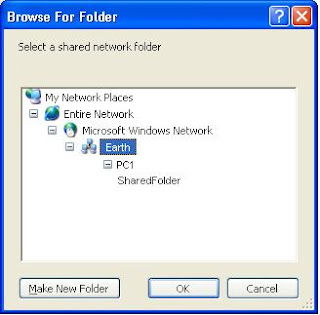
The files are now ready to be viewied on the second computer.
Friday, 25 January 2008
Making a WorkGroup

To make the workgroup i needed to go to the control panel and then click on the icon called 'system'. From this window i was able to change the computer name, which i did to PC1 and PC2, I then changed both of the work groups to EARTH on both of the computers. The computer then needed to be restarted and i was then able to start sharring the computer files.
I was able to share the files by right hanbd clicking on the file in which i wanted to share and then i clicked on sharin
Connecting Wireless

I connected the router to the wireless router which was plug and play, which meant it was ready to use. However i needed to connect it to 'PC2', but this computer was not wireless so i installed a PCI Wireless apdator. I installed this using the cd which it came with. The computer then picked up the wireless router, which it then connected to. Once it had connected i was then enabled to connect to the internet using the wirless router which was connected to the modem which was connected to the broadband
Connecting to the internet!

I connected the broadband to a modem and then the modem to the computer. Once i had made this connection i then was able to follow the instructions to install the modem from the CD and then restarted the router and the computer. Once this was done it was connected to the internet.
Connecting a Printer
I needed to connect the computer to an epson stylus c60 printer. To do this i needed to download the driver from the epson website. After entering the type of printer to the website i then was able to download the driver, which was downloaded and then unzipped. The installation wizard then was displayed on the screen, which I then followed the simple insturctions.
Installing a DVD Drive
I have installed a DVD Drive in to the an computer. This was done by opening up the computer an then removing the case so an dvd drive can be inserted in to the computer. Because there was already an dvd drive already installed into the computer i needed to make this one a slave to the other which was the master. I did this by leaving the pin in to the dvd drive when it was installed, this is because it uses the same wire to connect to the motherboard as first dvd drive.
Wednesday, 12 December 2007
Using Useful Utilitys
The utilites are needed to look after the computer, if they are used right you can keep the computer running fast and far more cleaner than just leaving it to build up. You can download many utilitys from the interent for your computer, or you can use the ones that microsoft include in their own operating system. Which are the following:
- Disc Cleanup
- Disc Defrag
- System Restore
 Disk Cleanup:
This is part of the microsoft onboard utilitys, and it is designed to free up space on the hard drive. The proccess normaly takes from any where from 2-15 minutes. It envoloves doing the following tasks. It envolves scanning the hard drive for files that are no longer in use. The user also has the option of compressing files if they dont want them to be removed. This is recommended to do as it will keep the computer running fast.
Compression of old files
Temporary Internet files
Temporary Windows files
Downloaded Program files
Recycle Bin
Removal of unused applications or optional Windows components
Setup Log files
Offline files
Disk Defragment:
Windows Disk Defragmenter is another computer program which is included in Microsoft Windows. The programme was designed to increase access speed of the computer. The application rearranging files stored on a disk to occupy contiguous storage locations, or defragmenting. The purpose of defrags are to optimize the time that it takes to read and write files from the hard drive. This proccess normaly takes from anything from 10 minutes to 3 hours.
System Restore:
This is when you restore your computer to a previous pre set virsion of your computer. By default the computer will save the state of the computer ever month or when an important update happens. This is so you can return to a previous virsion if anything happens with the computer.
Friday, 30 November 2007
Setting a Firewall
Microsoft windows XP has a firewall in serves pack 2, so all i need to do is to make sure it is turned on and to check the settings which the screenshot below show Why install a firewall?
 Why install a firewall?
I need to installl a firewall to keep the computer safe and fast. Firewalls will protect my computer from unwanted users, shielding it from unauthorized objects.
Doing a Defragment
The first step of disk defrafmenter is to select which hard drive you would like to analyze, but in this case i only have one hard drive so i can only analyze one. To get to Disk Defragmenter you go to ALL PROGRAMS then ACCESSORIES then DISK DEFRAGMENTER The last step to defragmenter is to click defragment and then letting the computer do the rest.
 Why do a Defrag?
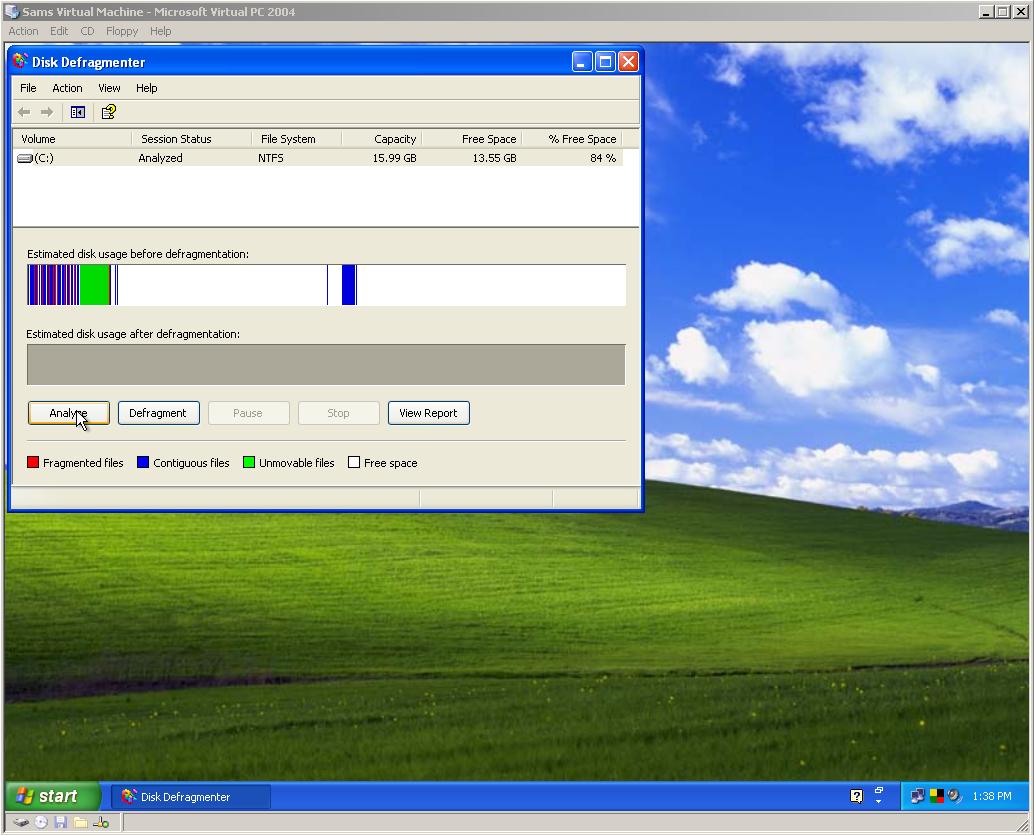 The last step to defragmenter is to click defragment and then letting the computer do the rest.
 Why do a Defrag?
Fragmentation affects the system performance, it will need to be done regularly to aviod slowing down the computer and keeping it quick and fresh. Windows Disk Defragmenter is designed to increase loading speeds and increase the amount of usable space. This process is done by rearranging the files stored on the hard disk to an appropert locations. The purpose of defrag in a whole is to optimize the time it takes to read and write files.
Connect to the web
Connecting to the proxy server oscar with the port 8080. This is done by going in to internet explorer options and then going to the tab connections, under this tab i then clicked lan settings and entered the server and port in to proxy servers address. Once theses settings have been applied i than can connect to the internet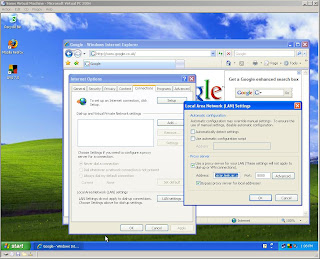

Installing Updates
Installing an update, is done by going to the microsoft windows update website, and then clicking the way you want to install the update, express(install all updates) or custom (chossing the updates you want) in this case the custom way. I then need to choose which updates i need and what updates there are. I have choosen to update the internet explorer to 7. Which is the update which i have selected.
 The update is then downloaded and installed automaticly to the computer, from the internet.

Internet explorer is now ready to use after i have choosen the correct settings that i want.
 Why update my Computer?
 I then need to choose which updates i need and what updates there are. I have choosen to update the internet explorer to 7. Which is the update which i have selected.
 The update is then downloaded and installed automaticly to the computer, from the internet.
Internet explorer is now ready to use after i have choosen the correct settings that i want.
 Why update my Computer?
I will need to keep my computer uptodate to get all of the fully free sercurity updates from microsoft, plus all of all the other free stuff.
Installing AVG FREE (VIRUS PROTECTION)
The screenshot below shows me down loading the Anti-Virus protection from AVG FREE's website.
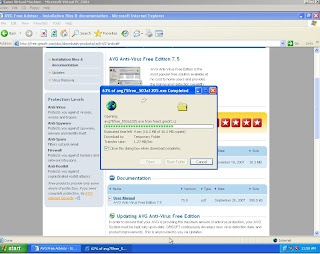
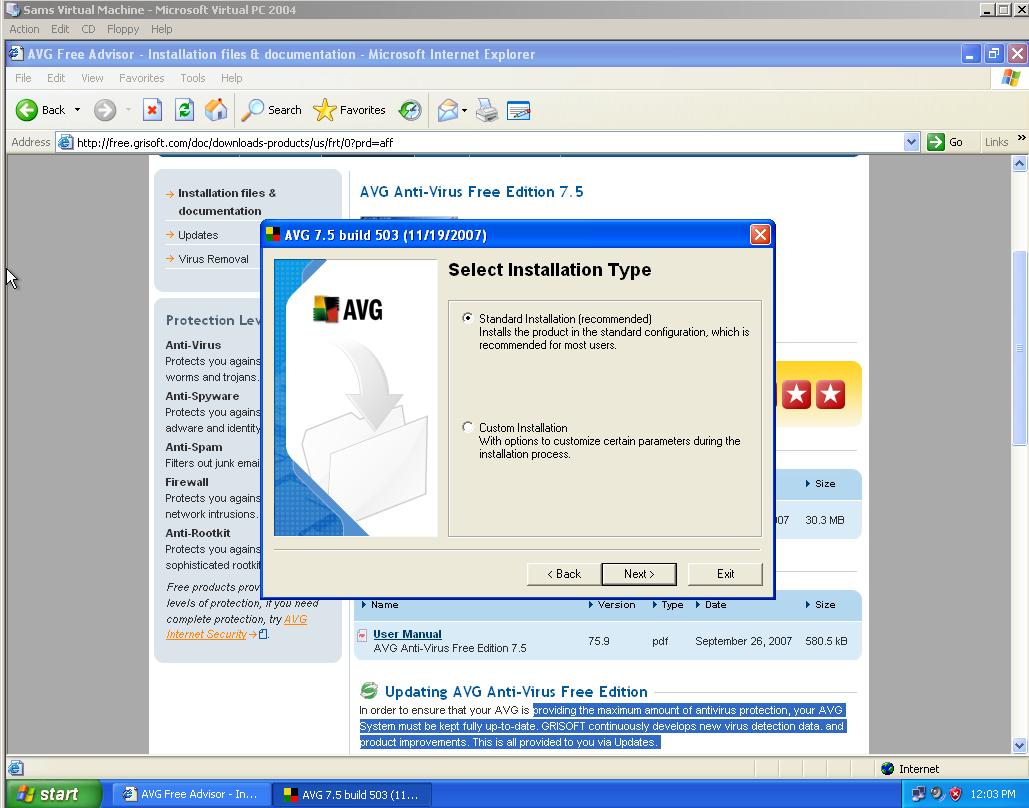
After i downloaded the software i then needed to install the software to the computers hard drive. I have selected to use the standard settings as the configuration will be already done. I then need to follow the choices before i can actualy install the software.
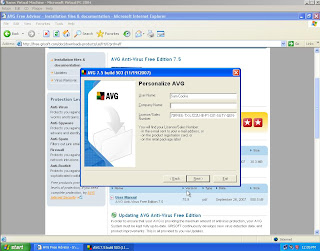
 After installation i then need to personalize AVG, for example how and when would i like an automatic scan of the computer, and when i scans do i want it to scan quick and slow down the rest of the computer, or do i want it slow and run the computer at normal speed. I can also at this stage choose what name i would like to register the software under.
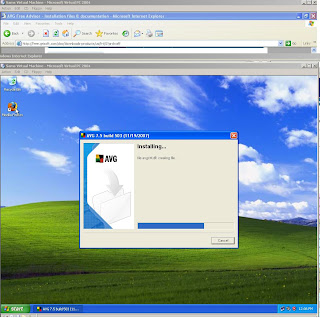
After personalizing and chossing the settings for the software it will then actuall install to the computer.
Once the programme opens the software then updates itself and then its ready to be used, and it will automaticly update itself.
 Why install Protection?

After i downloaded the software i then needed to install the software to the computers hard drive. I have selected to use the standard settings as the configuration will be already done. I then need to follow the choices before i can actualy install the software.
 After installation i then need to personalize AVG, for example how and when would i like an automatic scan of the computer, and when i scans do i want it to scan quick and slow down the rest of the computer, or do i want it slow and run the computer at normal speed. I can also at this stage choose what name i would like to register the software under.
After personalizing and chossing the settings for the software it will then actuall install to the computer.

Once the programme opens the software then updates itself and then its ready to be used, and it will automaticly update itself.
 Why install Protection?
Protection is need to prevent trojans and other types of viruses from the internet, by using this free protection i can keep my computer fresh, fast and free from viruses, which in effect will make the computer safe.
Wednesday, 28 November 2007
Installing Microsoft Windows XP

To install windows XP, the computer needs to boot from the CD which is done by just pressing any key, once the key has been pressed the computer will check to make sure that all the components are there for the computer to work, once this has done the computer can then go through the next stages.
 The next stage of the installation is to choose what you want to do in the setup, to setup windows XP, to repair windows, or to quit. Once entered has been pressed it then needs me to make sure that i agree with windows License agreement, when i do i the press F8. Then i need to choose which hard drive i would like to install windows on.
Then it will format the hard drive and install windows on to the computers hard drive.

The last part of the installation is to let the computer reboot and install the XP settings, such as networking. Once done the set up wizard will ask you if you want to registar windows. Then windows is ready to run.
Subscribe to:
Posts (Atom)